
Local Search and Brand Impersonation
Fake Google Maps Listings
When customers say a number on Google Maps sent them to the wrong business, first identify the exact listing they used. A separate listing, an edited official profile and an ownership issue each call for a different response.

Find the exact listing the customer used
Ask for the Maps link or a screenshot of the expanded listing, the location they searched for and the date they saw it. Keep the record at branch level. A national switchboard, a franchisee, a call-tracking number and a fraudster’s number may all look unfamiliar to a central team.
Compare the reported listing with your location register and the profile managed by the authorised owner. Record the public Maps link, displayed phone and website, business name, address or service area, and any visible changes. Ask the location lead to confirm the legitimate local contact routes. Use known official contact information to reach the branch while you investigate.
Decide whether to correct, recover or report the listing
Correct the official profile
If your team still manages the exact profile and can verify the approved contact details, review recent changes and restore accurate information. Check with the location owner before replacing a legitimate tracking number. Google explains how a verified owner edits a profile.
Recover access to the official profile
If your team no longer controls the same profile, preserve ownership and change records, secure the accounts used to manage it and follow the appropriate Google access route. Google’s ownership guidance covers verified profiles managed by someone else.
Report a separate deceptive listing
If the suspected listing has a different Maps link and misrepresents your branch, collect the official and suspicious links side by side. Explain the specific contact or identity mismatch. Google describes removal requests for inaccurate or ineligible profiles and provides a separate route for fraudulent information.
If both cards are legitimate or the problem is a duplicate status, check Google’s duplicate-profile guidance before choosing a removal route.
Handle the website behind the listing as a separate source
If the website button points to an unfamiliar host, confirm the documented destination with your location or web team. A regional booking partner or franchise page can be approved. Where the destination presents itself as the official brand and asks for bookings, payments or credentials, preserve the exact URL, visible claims and relevant brand comparison before escalating.
Restoring the Maps website link can protect the route from that listing. The outside site may still receive visitors from ads, direct links or other results. AdFlagger can evaluate the suspect domain and the evidence for a website takedown route, while the authorised profile owner works with Google on the listing.
Keep support and the branch on the same contact record
Give support the verified number and website for that location. Tell staff where to route new customer reports and what to ask for: the listing link, the reported contact route and the time they saw it. Keep private call recordings, payment details and customer identifiers out of the initial evidence packet. Avoid asking customers to call a suspicious number again.
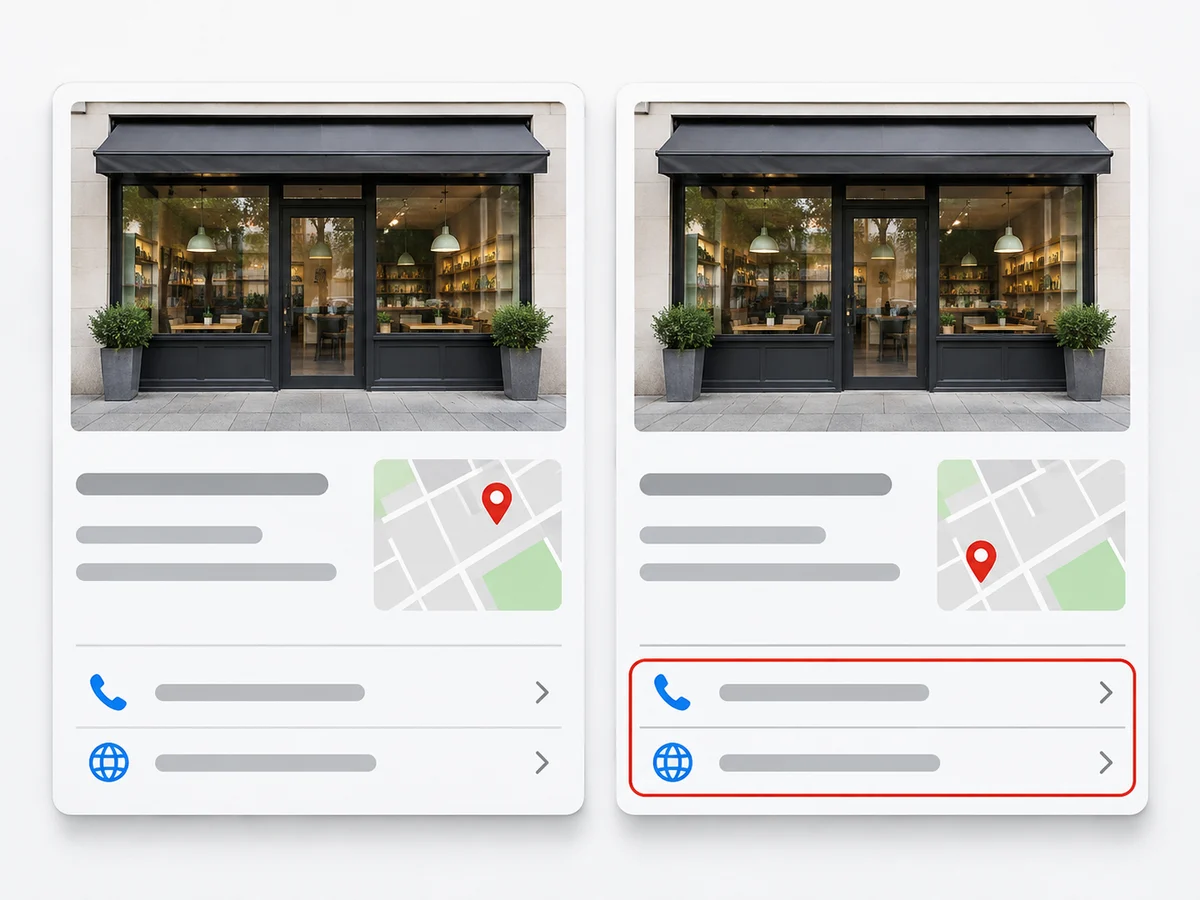
For example, a customer looking for a branch may see two cards with the same storefront photo. If one points to a different booking domain, save both listing links and the official branch record. The photo establishes why a person could confuse them. The different contact details are the part the reviewer needs to verify.
Verify the route a customer sees after the change
Search for the branch by name and location, then open the exact public listing in a customer view. Record whether the correct business name and location appear, what number the call control shows and where the website link points. If a second listing was involved, check its saved link as well. A report acknowledgement is a status update. The public result is the verification.
For a multi-location business, maintain a location register with the official profile link, number, website and local owner. Check locations where complaints or contact changes actually recur. If the destination operates as a fake help desk, see our guide to fake support websites for the next checks on the site itself.
Questions about this decision
When the affected profile is the official one, use the route appropriate to the access or data issue. Check ownership and manage the profile through the authorised owner or Google support.
Check the exact profile links, managers, names and eligibility. A duplicated location, a distinct business at the same address and deliberate impersonation each require a different response.
The change can correct the link visible in Maps. Check the saved destination separately, since it can remain reachable from other sources.
If the listing leads to a site that impersonates your brand, share that URL and the associated listing. AdFlagger can assess the destination and the relevant website response.